On this page
HyperFrames and Remotion both make video from a web page: headless Chrome draws each frame, the renderer saves it as a picture, and FFmpeg encodes the pictures into a video file. We ran both on the same 8-vCPU cloud server, rendering the subtitles and callouts that our video editor lays over 1080x1920 footage. HyperFrames 0.9.38 was 1.30 to 1.75 times as fast as Remotion 4.0.543. With both renderers at x264 ultrafast and JPEG 80 frame capture, HyperFrames reached 17.7 frames per second and Remotion reached 11.2. Both ran on one server on 12 November 2026. The gap was smallest when Remotion ran at its default preset and capture quality, on another server two days later: 11.2 fps against 8.6.
We ran the test to choose the renderer for Michael, our AI video editor, which runs on servers of this size. This post calls the subtitles and callouts it draws overlay cards. Our target was 16 to 20 fps. The result covers one workload, one server size and synthetic footage. HyperFrames' own comparison page gives no render speed figures [2]. Four other write-ups have timed both renderers on one machine, and one of them found Remotion 2.7 times as fast on a second render [11]. Section 7 compares those tests with this one. Three of the four drew motion graphics with no video in the frame. Ours puts cards over footage, on a server with no GPU, in cold chunks. The method, every setting and a data file are below, so you can check the numbers or rerun them. The section after the key takeaways explains how the two renderers work and what the settings mean.
Key takeaways
- HyperFrames was faster in every comparison. On one server at x264 ultrafast with JPEG 80 capture, it rendered four card types at 17.7 fps against Remotion's 11.2. The gap ran from 1.30 to 1.75 times across twelve comparisons, and was smallest with Remotion at its default settings.
- The x264 preset and the capture quality each added about a fifth. On one server, Remotion's front cards rose from 7.2 fps to 8.5 with x264 ultrafast alone, to 8.6 with JPEG 80 capture alone, and to 10.1 with both. HyperFrames'
draftquality changes both at once and was 42% faster thanlooks. - Every cold 10-second chunk paid 7 to 12 seconds of start-up. Rendering 30 seconds as one chunk lifted HyperFrames from 18.2 fps in 10-second chunks to 23.1 on the same server.
- HyperFrames chose too few workers. It picked 5 on 8 vCPUs and rendered our mixed plan at 16.5 fps. Set to 8 by hand, it reached 18.2.
- Two servers of the same size differed by 16%. HyperFrames ran the same job at 15.2 fps on one and 17.7 on another, so we compare renderers only within one server.
- The largest published Remotion lead came from a test with no video in the frame. On its second run of a 10-second promo, with everything installed on an Apple M5 Pro, Remotion took 3.2 seconds and HyperFrames 8.5 [11]. The only other test with footage in the frame found HyperFrames about 2.5 times as fast [14].
How the two renderers make a video
HyperFrames is an open-source renderer from HeyGen [1]. A HyperFrames video is an HTML page whose animation runs on a timeline. In Remotion, a video is a set of React components.
Both render in the same steps. Headless Chrome, a browser with no window, opens the page. For each frame, the renderer sets the page to that frame, saves a picture of it, and passes the picture to FFmpeg, which encodes the pictures into an H.264 video file. A 30-second video at 30 frames per second is 900 pictures. Both renderers split the work across several workers that capture frames at the same time.
Render speed is the number of frames finished per second of real time, counted from the start of the renderer to the finished file. At 10 fps, one minute of 30 fps video takes three minutes to render. At 18 fps it takes 1 minute 40 seconds. That speed decides how many videos one server can finish in an hour.
Two settings appear in every table below:
- Capture quality. Each frame is saved as a JPEG before it is encoded. JPEG 100 keeps the most detail and makes the largest pictures. JPEG 80 makes smaller ones and is Remotion's default [5].
- x264 preset. x264 is the H.264 encoder that FFmpeg uses here. The preset sets how hard it works on each frame.
ultrafastencodes quickest and makes the largest file, andmediumis x264's default [9].
1. What we measured
The workload. Michael places overlay cards on portrait video. We took five of them: a subtitle line, a keyword callout, a checklist, a product pin, and large text that sits behind the speaker. Each card is HTML and CSS animated by a GSAP timeline. A plan lists the cards of one video and when each appears. There are six plans. Five hold 20 seconds of one card back to back, and a mixed plan holds 30 seconds of all five the way a real video uses them. The output is 1080x1920 at 30 fps, encoded as H.264 at CRF 16.
The footage. The source video is synthetic: a figure swaying in front of a grainy moving background at about 12 Mbit/s. The behind-text card also needs the figure alone, which is a VP9 video with an alpha channel. No client video was used.
Chunks. A production render job is cut into 10-second chunks, so an edit re-renders only the chunks it touches. The benchmark renders the same way. Each chunk is one renderer process, started cold, with no frames kept from an earlier chunk.
Timing. The time of a chunk is the wall time of its whole process: starting Node and Chrome, extracting the source video's frames, capturing, and encoding. Frames per second is a plan's frames divided by the wall time of its chunks, and we report the median across repeats. "Front cards" pools the subtitle, keyword, checklist and product pin plans, which both renderers draw the same way. Audio is left out, because it is mixed once after the chunks are joined.
| Condition | Value |
|---|---|
| Server | A cloud virtual server with 8 shared vCPUs and 16 GB. Servers 1 to 4 ran in Singapore and server 5 in Sydney |
| CPU as reported | Intel, 2.0 GHz, one thread per core |
| Host and image | Ubuntu 24.04 with Docker; image built on Debian bookworm with Node 22 |
| HyperFrames | 0.9.38, with GSAP 3.12.5 [1] |
| Remotion | 4.0.543, with React 19.3.1 and GSAP 3.12.5 [4] |
| Browser | Chrome for Testing headless shell 157.0.8103.50, the same binary for both |
| Fonts | Noto Sans CJK and Noto Color Emoji |
| Output | 1080x1920, 30 fps, H.264, CRF 16 |
| Repeats | Two or three per plan; one run per worker count. On server 5, two runs per setting of every plan except behind text, the second round in reverse order |
| CPU steal | Under 0.3% in every chunk on servers 1 to 4. On server 5, 0.4% to 1.8% averaged over one of those runs, and up to 7.2% in one chunk |
| Dates | 12 and 14 November 2026 (UTC), five servers, each destroyed after its run |
The five servers ran for 31 to 81 minutes each and cost about 0.72 US dollars in all. Server 5 ran in Sydney because this size was not offered in Singapore that day.
The same card code on both renderers
A HyperFrames composition is an HTML page with a paused GSAP timeline. The renderer seeks the timeline to each frame's time and then captures the frame [2]. Our cards already worked that way.
For Remotion we wrapped the same card files in one React composition. It builds the GSAP timeline once, then seeks it to frame / 30 in a layout effect on every frame. The source video plays through Remotion's OffthreadVideo, which extracts each frame with FFmpeg outside the browser [7]. On a development Mac, the two renderers' frames matched at every moment we sampled, chunk boundaries included.
The comparison therefore holds the animation code, the Chrome build, the fonts and the encoder settings fixed, and changes the renderer. It also means the Remotion side is written the way HyperFrames expects animation. A composition written in Remotion's own style, where React computes each frame's values, could perform differently. We did not test one.
2. Results on the same server
Each row below ran both renderers on one server, one after the other.
| Configuration | HyperFrames, fps | Remotion, fps | Ratio |
|---|---|---|---|
| x264 medium, JPEG 100 capture, default workers, front cards (server 3) | 10.3 | 7.2 | 1.43 |
| x264 medium, JPEG 100 capture, default workers, mixed plan (server 3) | 9.7 | 6.7 | 1.45 |
| x264 ultrafast, JPEG 80 capture, default workers, front cards (server 4) | 17.7 | 11.2 | 1.58 |
| x264 ultrafast, JPEG 80 capture, default workers, mixed plan (server 4) | 16.5 | 10.3 | 1.60 |
| x264 ultrafast, JPEG 80 capture, 8 workers, mixed plan (server 4) | 18.2 | 13.5 | 1.35 |
| x264 ultrafast, JPEG 80 capture, one 30-second chunk, 6 workers, mixed plan (server 4) | 23.1 | 13.2 | 1.75 |
| x264 medium, JPEG 100 capture, default workers, front cards (server 5) | 11.2 | 7.2 | 1.56 |
| x264 medium, JPEG 100 capture, default workers, mixed plan (server 5) | 10.6 | 6.6 | 1.61 |
| x264 medium, HyperFrames at JPEG 100 and Remotion at its default JPEG 80, default workers, front cards (server 5) | 11.2 | 8.6 | 1.30 |
| x264 medium, HyperFrames at JPEG 100 and Remotion at its default JPEG 80, default workers, mixed plan (server 5) | 10.6 | 7.8 | 1.36 |
| x264 ultrafast, JPEG 80 capture, default workers, front cards (server 5) | 15.9 | 10.1 | 1.57 |
| x264 ultrafast, JPEG 80 capture, default workers, mixed plan (server 5) | 15.2 | 9.3 | 1.63 |
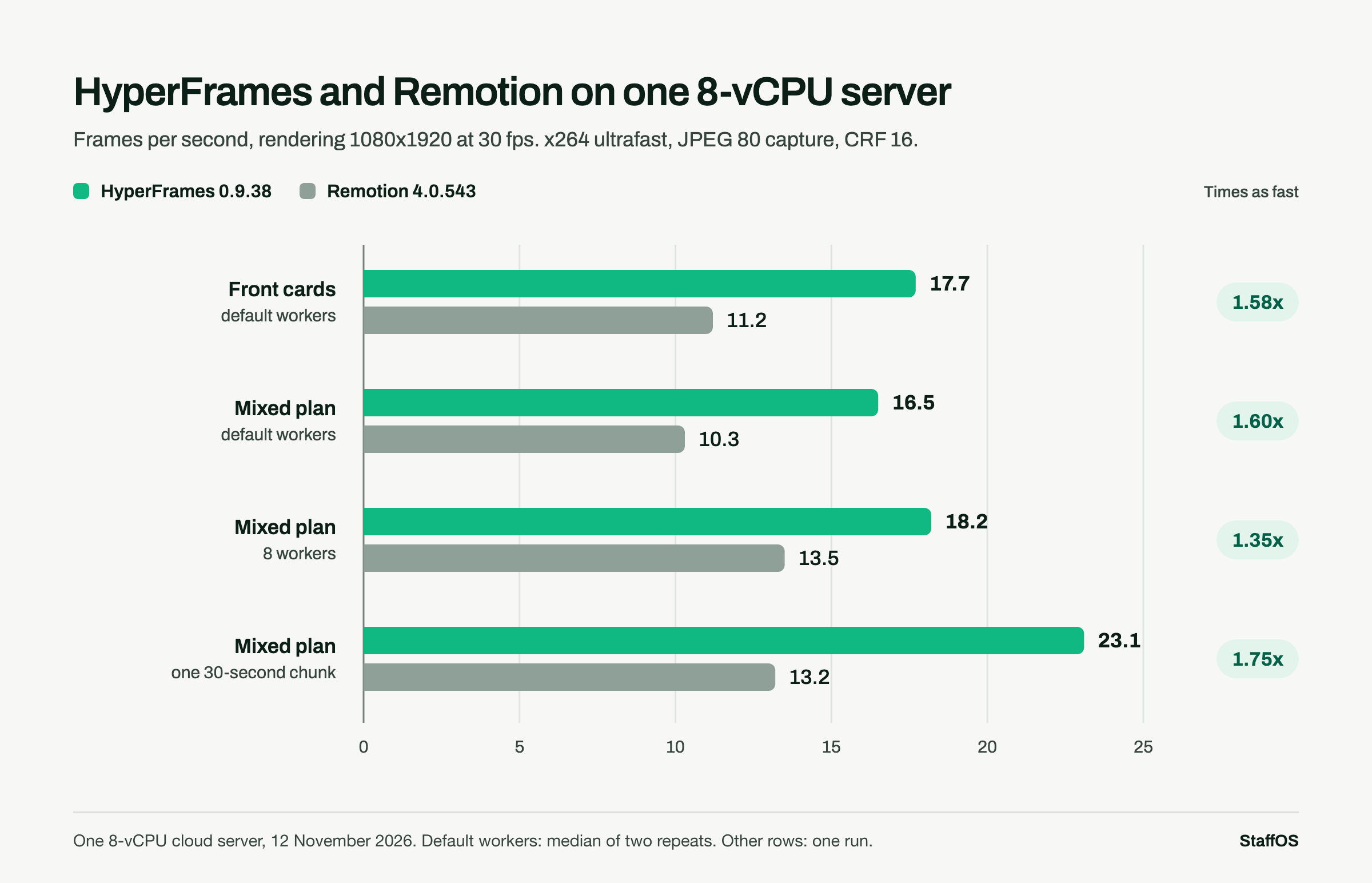
Figure 1. The four server 4 rows of the table: x264 ultrafast, JPEG 80 capture, CRF 16, 1080x1920 at 30 fps. The axis starts at zero.
"Default workers" means each renderer's own choice. HyperFrames calibrates on a few test frames and picked 5 workers on this server. Remotion's default concurrency is half the CPU threads, which is 4 here [6].
Three notes on fairness:
- Remotion's default capture quality is JPEG 80 [5]. In the JPEG 100 rows we raised it to match HyperFrames'
looksquality, so those rows are slower than a stock Remotion render. The two server 5 rows that name Remotion's default run it at the preset and capture quality it ships with, x264 medium and JPEG 80, against HyperFrames atlooks. There the gap was smallest, at 1.30 and 1.36. - Server 5 was noisier than the others. Its second round was slower than its first in every setting, by up to 17%. Taking HyperFrames' slower round at
looksagainst Remotion's faster round at its defaults, HyperFrames was still 1.22 times as fast on the front cards. - The behind-text card is left out of the ratios. On server 4 HyperFrames rendered it at 12.7 fps and Remotion at 6.4. Remotion extracts a video with alpha as one PNG per frame, which its documentation says slows a render [7], so that pair is not like for like.
3. The x264 preset and capture quality each added about a fifth
HyperFrames 0.9.38 sets its encoder through a --quality flag [3]. In that version, looks is x264 medium, delivery is x264 fast, and draft is x264 ultrafast with frames captured as JPEG 80 instead of JPEG 100. We held the CRF at 16 for all three.
| HyperFrames quality | x264 preset | Capture | Front cards, fps | Mixed plan, fps | MB per 10 s | Server |
|---|---|---|---|---|---|---|
looks |
medium | JPEG 100 | 11.2 | 10.9 | about 21 | 1 |
delivery |
fast | JPEG 100 | 11.4 | 11.0 | 20.7 | 2 |
draft |
ultrafast | JPEG 80 | 15.2 | 14.5 | 42.8 | 2 |
looks |
medium | JPEG 100 | 11.2 | 10.6 | 20.7 | 5 |
draft |
ultrafast | JPEG 80 | 15.9 | 15.2 | 42.8 | 5 |
Remotion takes the two settings as separate flags [4]. On server 5 we ran it at all four pairings, twice each:
| Remotion x264 preset | Capture | Front cards, fps | Mixed plan, fps | MB per 10 s | Server |
|---|---|---|---|---|---|
| medium | JPEG 100 | 7.2 | 6.7 | 25.6 | 3 |
| veryfast | JPEG 100 | 7.8 | 7.0 | 24.2 | 3 |
| ultrafast | JPEG 80 | 11.2 | 10.3 | 30.9 | 4 |
| medium | JPEG 100 | 7.2 | 6.6 | 25.5 | 5 |
| medium | JPEG 80 (Remotion's default) | 8.6 | 7.8 | 18.3 | 5 |
| ultrafast | JPEG 100 | 8.5 | 8.0 | 49.1 | 5 |
| ultrafast | JPEG 80 | 10.1 | 9.3 | 30.6 | 5 |
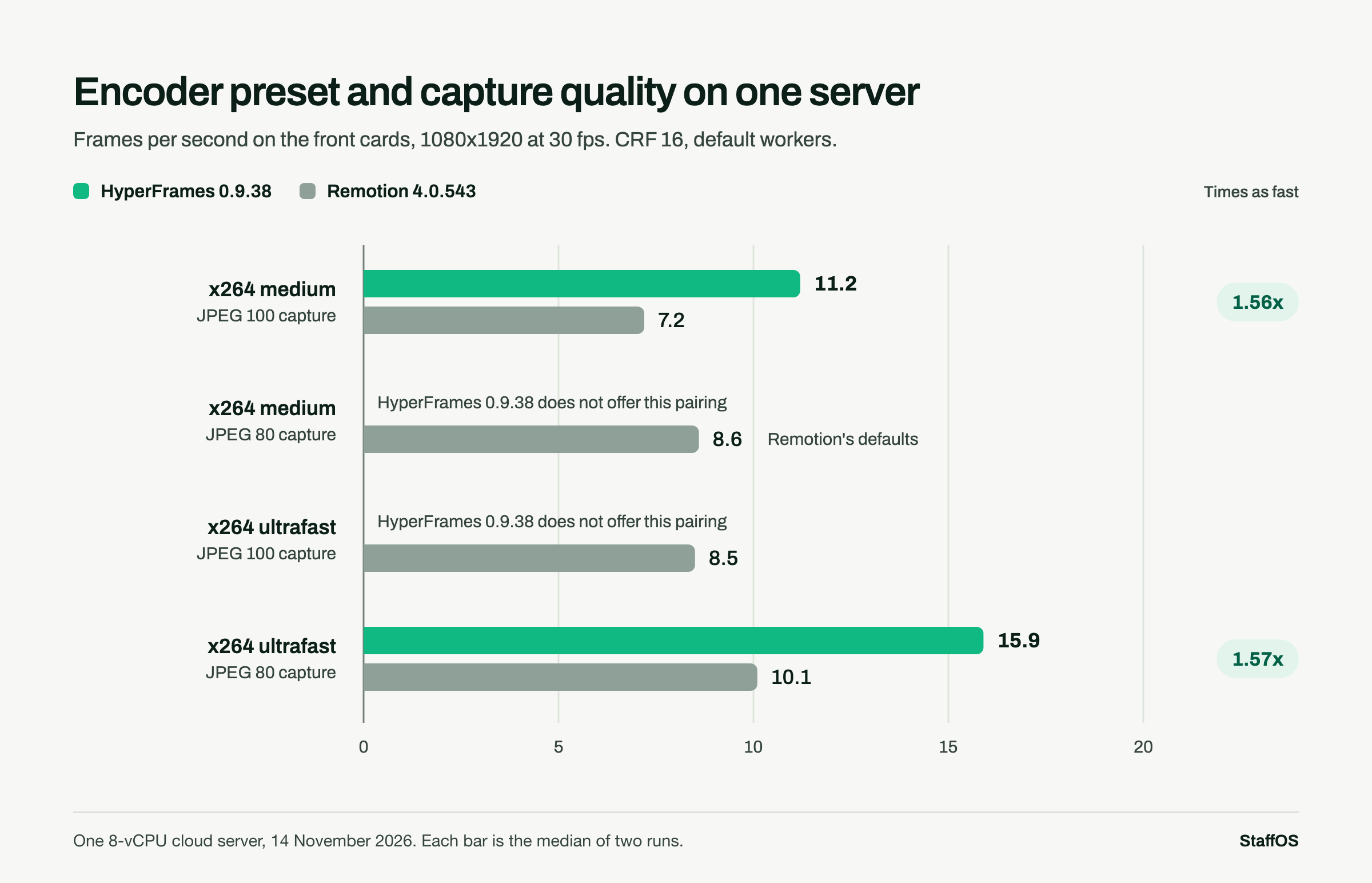
Figure 2. The server 5 rows of the two tables above, front cards only. Each bar is the median of two runs. The axis starts at zero.
For Remotion on server 5, the two settings were worth about the same. On the front cards, x264 ultrafast alone gained 18% (7.2 to 8.5 fps), JPEG 80 capture alone gained 19% (7.2 to 8.6), and the two together gained 40% (7.2 to 10.1). On the mixed plan the gains were 21%, 18% and 41%. The combined gain is close to the two single gains multiplied together: 1.18 times 1.19 is 1.40.
HyperFrames 0.9.38 cannot set the preset and the capture quality apart. Moving from looks to draft changes both, and on server 5 it gained 42% on the front cards and 43% on the mixed plan, close to Remotion's combined gain. The smaller preset steps did less. With capture held at JPEG 100, x264 fast gained HyperFrames 2% (across two servers) and x264 veryfast gained Remotion 8% (on server 3).
Capture is the larger share of the work. At x264 medium, HyperFrames spent 69% of its wall time in capture, with the encoder running alongside.
The faster preset has a cost in file size. A faster x264 preset compresses less at the same CRF [9], and the draft files were twice as large: 42.8 MB per 10 seconds against about 21. Remotion's files at the same settings were 30.9 MB. Lower capture quality worked the other way. At either preset, Remotion's files were smaller with JPEG 80 capture than with JPEG 100: 18.3 MB against 25.5 at medium, and 30.6 against 49.1 at ultrafast. If size matters, re-encode the joined video once at a slower preset.
We checked picture quality on one chunk. The same keyword chunk rendered at draft and at looks measured SSIM 0.987 and PSNR 46.5 dB against each other, and the text edges looked the same at 2x zoom. That check ran on the Mac, and it is not a perceptual score such as VMAF.
4. Start-up cost and worker count
Each cold chunk pays a fixed cost
With HyperFrames, every 10-second chunk spent 7 to 12 seconds on work that does not grow with the chunk: starting Node and Chrome, extracting the chunk's source frames (about 40% of it), calibrating workers and setting up. Counting frames over capture time alone, HyperFrames ran at 16.3 fps on the front cards at x264 medium and at 24.5 fps at draft.
A longer chunk spreads that cost over more frames. All rows are the mixed plan.
| Renderer and settings | 10-second chunks, fps | One 30-second chunk, 6 workers, fps |
|---|---|---|
| HyperFrames, medium, JPEG 100 (server 1) | 10.5 at 6 workers | 12.8 |
HyperFrames, draft (server 2) |
16.0 at 8 workers | 19.7 |
HyperFrames, draft (server 4) |
18.2 at 8 workers | 23.1 |
| Remotion, medium, JPEG 100 (server 3) | 8.1 at 6 workers | 7.4 |
| Remotion, ultrafast, JPEG 80 (server 4) | 12.0 at 6 workers | 13.2 |
HyperFrames gained 22% to 27% from the longer chunk. Remotion gained 10% on one server and lost 9% on the other, which we did not look into. For Remotion we built the bundle once and kept it outside every timing, so its chunks carry less start-up work than a first render would.
Longer chunks make an edit more expensive, since changing one subtitle then re-renders 30 seconds instead of 10. The other route is a render process kept warm between chunks. We did not measure one.
Set the worker count by hand
All figures are the mixed plan in 10-second chunks, one run each unless noted.
| Workers | HyperFrames, medium (server 1) | HyperFrames, draft (server 2) |
Remotion, medium, JPEG 100 (server 3) | Remotion, ultrafast, JPEG 80 (server 4) |
|---|---|---|---|---|
| 2 | 8.2 | not run | 4.7 | not run |
| 4 | 10.6 | 14.6 | 6.8 | 10.3 (median of two) |
| 6 | 10.5 | not run | 8.1 | 12.0 |
| 8 | 10.9 | 16.0 | 7.2 | 13.5 |
At x264 medium, HyperFrames was flat from 4 workers up. At draft, 8 workers beat 4 by 10%, and on server 4 they beat HyperFrames' own choice of 5 by the same margin (18.2 fps against 16.5). Remotion peaked at 6 at the slower settings and at 8 at the faster ones. Neither default was the best setting at the faster encode, so sweep the count on your own machine.
Give each chunk its own composition
HyperFrames can render part of a long composition with --start and --end. In 0.9.38 that was slow. Rendering 6 seconds out of one long composition took 24.2 seconds, and rendering the same 6 seconds as a short composition of its own took 9.7 and 11.2 seconds, on the same Mac, minutes apart. That is 2.2 to 2.5 times as long. The benchmark gives each chunk its own composition.
5. Operating notes for HyperFrames 0.9.38
These are things we had to set or work around before the numbers were trustworthy.
- Pin the version. HyperFrames had 625 npm releases between 0.1.0 on 23 March 2026 and 0.9.38 on 12 November 2026, and 15 of them came in the three days before 0.9.38 [10]. Version 0.9.39 followed the same day. Remotion shipped 12 releases from October 2026 to 4.0.543. Rerun a benchmark like this one before each upgrade.
- Turn off telemetry and the update check. The CLI sends usage telemetry unless
HYPERFRAMES_NO_TELEMETRY=1orDO_NOT_TRACK=1is set, and it checks for updates unlessHYPERFRAMES_NO_UPDATE_CHECK=1is set. With all three set, a render worked in a container with networking switched off. - One render at a time per user. A second
hyperframes renderby the same user waits for the first through a lock.HYPERFRAMES_RENDER_LOCK=offremoves the lock, and--no-waitmakes a blocked render fail and keeps a wait out of a timing. - The capture path depends on the machine. On macOS, HyperFrames captured by screenshot with the GPU. In a Linux container it captured with Chrome's BeginFrame and software GL. Measure on the kind of machine you will run.
- Check the Docker build argument. HyperFrames' own render Dockerfile declares
ARG TARGETARCH=amd64. Copied as it stands, that default put an amd64 FFmpeg into an arm64 image on our Mac. Declare the argument without a default. - Install the extra CJK font package. Debian's
fonts-noto-cjkhas only the Regular and Bold faces of Noto Sans CJK. Cards drawn at weights 800 and 900 fall back to Bold unlessfonts-noto-cjk-extrais installed.
On licences: HyperFrames is published under Apache 2.0 [1]. Remotion is free for individuals and for companies of up to three people, and a larger company needs a company licence [8]. The benchmark passed Remotion no licence key. For us, speed settled the choice before the licence came into it.
6. Limits of this benchmark
- The sample is small. Each plan ran two or three times and each worker count once. Each server 5 setting ran twice. There are no confidence intervals. Repeats of one plan on one server spread widely: the subtitle plan at x264 medium ran at 11.4, 13.0 and 10.3 fps.
- One server size, with shared vCPUs. A dedicated-CPU server, a larger one or one with a GPU will give different numbers. Two servers of this size differed by 16% on the same job.
- The footage is synthetic, and we tested five of 38 card types. Cards with heavy glow cost more: HyperFrames' own calibration put a behind-text frame, with four stacked text shadows, at 55 to 70 ms of capture against 33 to 35 ms for a keyword frame.
- The Remotion composition seeks a GSAP timeline. A composition written the React way was not tested.
- Footage was always in the frame. We did not render the cards over a plain background, so we cannot say how much of the gap comes from the video.
- Preset and capture quality were separated for Remotion only, on one server, with two runs per setting. HyperFrames 0.9.38 offers no way to set them apart. That server also had more CPU steal than the other four.
- Quality was checked with SSIM and PSNR on one chunk. There is no VMAF score.
- Every chunk started cold. A long-running render server was not measured for either renderer.
- The settings were not run as one. We measured x264 ultrafast with 8 workers and with one 30-second chunk at 6 workers. We did not run 8 workers and 30-second chunks together.
- The versions will age. Every figure belongs to HyperFrames 0.9.38 and Remotion 4.0.543.
7. Why other published tests disagree
By November 2026, four other write-ups had timed both renderers on one machine. Gennaro Santoro found HyperFrames well ahead. Orshot found Remotion faster on a second render and HyperFrames faster from an empty folder. The other two found the renderers level on some clips and HyperFrames ahead on others.
| Test | Machine | What it rendered | How it was timed | Result |
|---|---|---|---|---|
| Orshot [11] | Apple M5 Pro, 48 GB | 10-second 1080p promo: text, a product photo, four fades | Second render, everything installed; median of 3 | Remotion 3.2 s, HyperFrames 8.5 s |
| Orshot [11] | Same | Same | First render from an empty folder, install included | HyperFrames 17.5 s, Remotion 29.5 s |
| Gharib89 [12] | NVIDIA RTX 2070 | 1080p scene: springs, an SVG path, one line of text | Five alternating runs | 10 s clip: HyperFrames 7.37 s, Remotion 7.41 s, or 6.73 s with its GPU turned on. 60 s clip: HyperFrames 23.41 s, Remotion 27.76 s, or 23.75 s with its GPU turned on |
| RepoSquare [13] | 2-core cloud machine | 12-second chart; 20-second explainer with captions and icons | One run each | Chart: about 28 s each. Explainer: HyperFrames 49 s, Remotion 68 s |
| Gennaro Santoro [14] | M-series Mac mini | 78.7-second edit over speaker footage, with captions and overlays | Not stated | HyperFrames 121 s. Remotion 298 s, and 836 s with the machine under load |
| This post | 8 shared vCPUs, Linux, no GPU | 1080x1920 cards over 12 Mbit/s footage, in 10-second chunks and once as one 30-second chunk | Every chunk cold; one to three runs per setting | 10-second chunks: HyperFrames 1.30 to 1.63 times as fast. One 30-second chunk, one run: 1.75 times |
Orshot's author sells a hosted render API and says so. HyperFrames versions ran from 0.7 to 0.9.38 across these tests, and none of the others says it ran the same animation code on both renderers. So the table cannot settle which renderer is faster. It does show five ways the tests differ, and each could move the result.
What is in the frame. Only Gennaro Santoro's test and ours had video in the frame, and both found HyperFrames well ahead. The tests without video came out mixed: level on some clips, HyperFrames ahead on others, and Remotion ahead on Orshot's second render. The two renderers handle video differently. HyperFrames extracts a chunk's video frames before it captures anything. Remotion's OffthreadVideo extracts each frame with FFmpeg, outside the browser, while the render runs [7]. We did not measure which approach costs less. Our own cards always had footage behind them, so we cannot split our gap between the video and the cards.
Fixed cost against clip length. Remotion's second render in Orshot's test finished 300 frames in 3.2 seconds, about 94 frames per second. On a fast machine with a short clip, the work before the first frame decides much of the race. Gharib89 puts HyperFrames' fixed setup at about 1.4 seconds on that machine, and every cold chunk in our runs spent 7 to 12 seconds before capture. Our data suggests HyperFrames carries more of this fixed cost than Remotion does. Rendering the mixed plan as one 30-second chunk instead of three 10-second chunks sped HyperFrames up by 22% to 27%. It sped Remotion up by 10% on one server and slowed it by 9% on another. Part of that difference is ours: we built Remotion's bundle outside every timing, so its chunks carried less start-up work than a first render would.
Worker count on a large machine. Remotion's default concurrency is half the CPU threads [6], so on a large laptop it starts several workers without being asked. HyperFrames picks its own count from a short calibration, and it picked too few for us: 5 on our 8 vCPUs, where 8 rendered 10% faster. Orshot left Remotion at its defaults and set no worker count for HyperFrames, and did not report how many workers either one used.
Each renderer's own code, or the same code on both. Orshot, RepoSquare and Gennaro Santoro wrote each video in that renderer's own style, React for Remotion and HTML with GSAP for HyperFrames. We ran HyperFrames' style on both. Seeking a GSAP timeline inside React on every frame may cost Remotion speed it would not lose with its own style. If it does, our test is tilted towards HyperFrames by that amount. We did not measure it.
The GPU. Remotion draws WebGL on the CPU by default. In Gharib89's test, turning the GPU on brought Remotion level with HyperFrames on the 60-second clip and put it 0.6 seconds ahead on the 10-second clip [12]. Gharib89 puts that 0.6 seconds down to HyperFrames' fixed setup and calls the two level. Our server has no GPU, so neither renderer had one.
If your videos put cards over footage and render on CPU servers in short cold chunks, our numbers are the closer guide. If you render short motion graphics with no video on a fast laptop, Orshot's second render is the closer guide, and Remotion may well be faster there. Either way, set the worker count by hand and time one of your own clips before you choose.
8. How to rerun it
Each chunk is one command. HyperFrames renders a project folder that holds the chunk's index.html:
HYPERFRAMES_NO_TELEMETRY=1 HYPERFRAMES_NO_UPDATE_CHECK=1 \
npx hyperframes@0.9.38 render ./chunk-project -o chunk.mp4 \
  --fps 30 --quality draft --crf 16 --workers 8 \
  --no-wait --frames-cache-dir off
Remotion bundles the composition once, then renders each chunk as a frame range:
npx remotion bundle src/index.jsx --public-dir public --out-dir bundle
npx remotion render bundle bench chunk.mp4 --props props.json \
  --frames 0-299 --concurrency 8 --codec h264 --crf 16 \
  --x264-preset ultrafast --image-format jpeg --jpeg-quality 80 --muted
Time the whole process from outside, read CPU steal from /proc/stat before and after each chunk, and run both renderers on the same machine in the same hour. The data file holds every figure in this post with its server, settings and number of repeats.
What we chose
We chose HyperFrames for Michael, at draft quality and CRF 16, with the worker count set to 8 by hand and chunks longer than 10 seconds where editing allows. On the two servers that ran those settings, the mixed plan rendered at 16.0 and 18.2 fps with 8 workers and at 19.7 and 23.1 fps as one 30-second chunk, which is inside or above our 16 to 20 fps target.
We keep the benchmark in our repository and will rerun it before each renderer upgrade. For how we test changes to an agent's instructions and tools the same way, see agent harness engineering.
Author and citation
Vin Lim is CTO of StaffOS. He works on agent orchestration, business integrations, context management and evaluation.
Suggested citation: Lim, V. (2026). HyperFrames vs Remotion: render speed on an 8-vCPU server. StaffOS engineering benchmark, version 1.1, November 17. https://staffos.xyz/blog/hyperframes-vs-remotion-render-benchmark
Download the BibTeX citation · Download the benchmark data · Figure 1 as SVG · Figure 2 as SVG
Ratios divide the HyperFrames figure by the Remotion figure from the same server. Percentage gains use the rounded figures in the tables. With two runs, the median is the mean of the two.
Common questions
Is HyperFrames faster than Remotion?
In our test it was. On one 8-vCPU cloud server, HyperFrames 0.9.38 rendered 1080x1920 overlay cards at 17.7 fps and Remotion 4.0.543 at 11.2 fps, both at x264 ultrafast with JPEG 80 frame capture. Across twelve comparisons, each on one server, HyperFrames was 1.30 to 1.75 times as fast. The gap was smallest with Remotion at its default settings. The test covers one workload and one server size, with the same GSAP card code on both renderers.
Why do some tests find Remotion faster than HyperFrames?
The published test with the largest Remotion lead rendered a 10-second promo with no video in it on an Apple M5 Pro. On its second run, with everything installed, Remotion took 3.2 seconds and HyperFrames 8.5. Our test put cards over footage on an 8-vCPU Linux server with no GPU, in cold 10-second chunks, and HyperFrames was 1.30 to 1.63 times as fast. With the mixed plan rendered as one 30-second chunk, it was 1.75 times as fast. The only other published test with footage in the frame also found HyperFrames faster. Our data suggests HyperFrames pays a larger fixed cost per render, and on our server it picked too few workers on its own. Both would count most for short clips on fast machines. Our Remotion side ran HyperFrames-style GSAP code, which may have cost it speed.
How fast can headless Chrome render 1080x1920 video on 8 shared vCPUs?
In our runs, HyperFrames 0.9.38 reached 10.9 frames per second at x264 medium with JPEG 100 capture and 16.5 fps at x264 ultrafast with JPEG 80 capture, in cold 10-second chunks. Rendering 30 seconds as one chunk raised that to 23.1 fps. Remotion 4.0.543 rendered the same plan at 4.7 to 13.5 fps, depending on its settings and worker count.
Which render setting made the biggest difference?
For Remotion, the x264 preset and the frame capture quality counted about equally. On one server, x264 ultrafast alone raised the front cards from 7.2 to 8.5 fps, JPEG 80 capture alone raised them to 8.6, and the two together to 10.1. HyperFrames 0.9.38 changes both at once: its draft quality (x264 ultrafast, JPEG 80) was 42% faster than its looks quality (x264 medium, JPEG 100) on the same server.
How many render workers should an 8-vCPU server use?
Eight, in our runs at the faster settings. HyperFrames 0.9.38 chose 5 workers by itself and rendered our mixed plan at 16.5 fps. Set to 8 by hand, it reached 18.2 fps on the same server. Remotion 4.0.543 went from 10.3 fps at its default concurrency of 4 to 13.5 fps at 8.
Does Remotion need a paid licence?
Remotion is free for individuals and for companies of up to three people. A larger company needs a company licence. HyperFrames is published under the Apache 2.0 licence. Our benchmark passed Remotion no licence key and was an evaluation.
Sources
- 1.HyperFrames. Source repository and Apache 2.0 licence. GitHub.
- 2.HyperFrames documentation. HyperFrames vs Remotion.
- 3.HyperFrames documentation. Rendering.
- 4.Remotion documentation. npx remotion render: x264 presets, JPEG quality, concurrency and frame ranges.
- 5.Remotion documentation. Configuration file: setJpegQuality(), default 80.
- 6.Remotion documentation. renderMedia(): default concurrency.
- 7.Remotion documentation. OffthreadVideo: frame extraction and the transparent option.
- 8.Remotion documentation. License and pricing.
- 9.FFmpeg wiki. H.264 video encoding guide: presets and CRF.
- 10.npm. hyperframes package, version history.
- 11.Orshot. Remotion alternatives and what they cost to run: the same 10-second video in Remotion, HyperFrames and Orshot. October 2026. The author built Orshot.
- 12.Gharib89/skills issue 966. Remotion or HyperFrames for freely authored scenes: render times on an RTX 2070. GitHub, October 2026.
- 13.RepoSquare. Is HyperFrames better than Remotion for Claude Code? October 2026.
- 14.Gennaro Santoro. HyperFrames vs Remotion: one storyboard, two AI video tools, scored.
Written by
Co-founder / CTO, StaffOS
Vin Lim is CTO of StaffOS. His work covers agent orchestration, business integrations, context management and the systems used to evaluate and improve AI agents.
Read next
Engineering
Security engineering for AI agent connectors: nine failure classes
How StaffOS secures the external tools its AI agents call: nine failure classes, from SSRF and URL templates to secret scope, and the control for each.
Vin Lim 27 min read
Engineering
Agent harness engineering: improving AI without fine-tuning
How StaffOS engineers context, tools and execution controls with fixed model weights. Public research benchmarks, synthetic test cases and reproducible charts.
Vin Lim 13 min read
WhatsApp Platform
WhatsApp will charge for every message from October 1. The bill lands hardest on chatty automation.
From October 1, 2026, Meta bills every message a business sends on the WhatsApp API, replies in the 24-hour window included. The math, and how to build for it.
Same Tham 16 min read